
Introduction
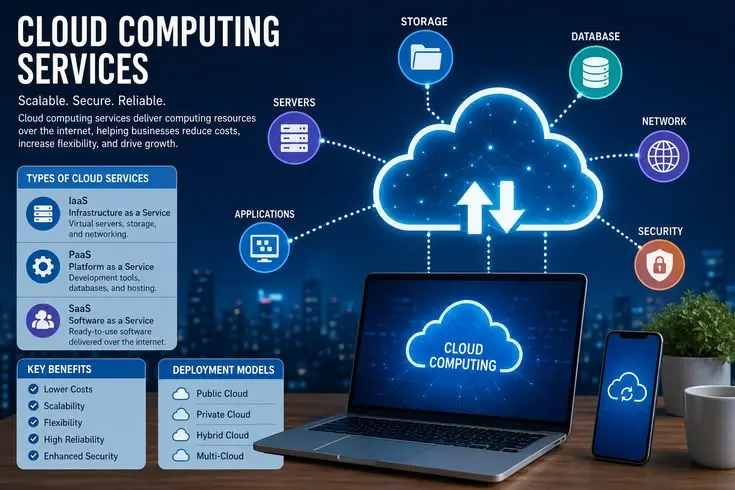
Cloud computing has become one of the most important technologies shaping the modern digital world. From streaming movies to storing photos and running massive business systems, cloud computing powers almost everything we use online today. Instead of relying on physical hardware or local servers, cloud computing allows users and businesses to access computing resources like storage, servers, databases, networking, and software over the internet.
This shift has made technology more flexible, scalable, and cost-efficient than ever before. Beginners often think cloud computing is complex, but in reality, it is simply the delivery of computing services over the internet in a way that is easy to use and highly efficient.
Today, companies of all sizes—from startups to global enterprises—depend on cloud platforms to run their operations. It helps reduce infrastructure costs, improves performance, and allows access to data from anywhere in the world. Whether you are a student, business owner, or aspiring IT professional, understanding cloud computing is essential for future growth. This guide will break down everything in simple terms, including what cloud computing is, why it matters, how it works, its benefits, risks, and practical steps to get started.
What is Cloud Computing?
Cloud computing is a technology that allows users to access and store data, applications, and computing power over the internet instead of using local computers or physical servers. In simple terms, it means using someone else’s powerful computers through the internet to perform tasks that your own device may not handle efficiently. These services are hosted in large data centers managed by cloud providers and are delivered on-demand.
The cloud works on a simple principle: instead of buying and maintaining expensive hardware, users rent computing resources as needed. These resources include storage space, processing power, databases, and software applications. Popular cloud service providers like Amazon Web Services (AWS), Microsoft Azure, and Google Cloud Platform make it possible for individuals and businesses to scale their operations quickly without worrying about infrastructure management.
Why is Cloud Computing Important?
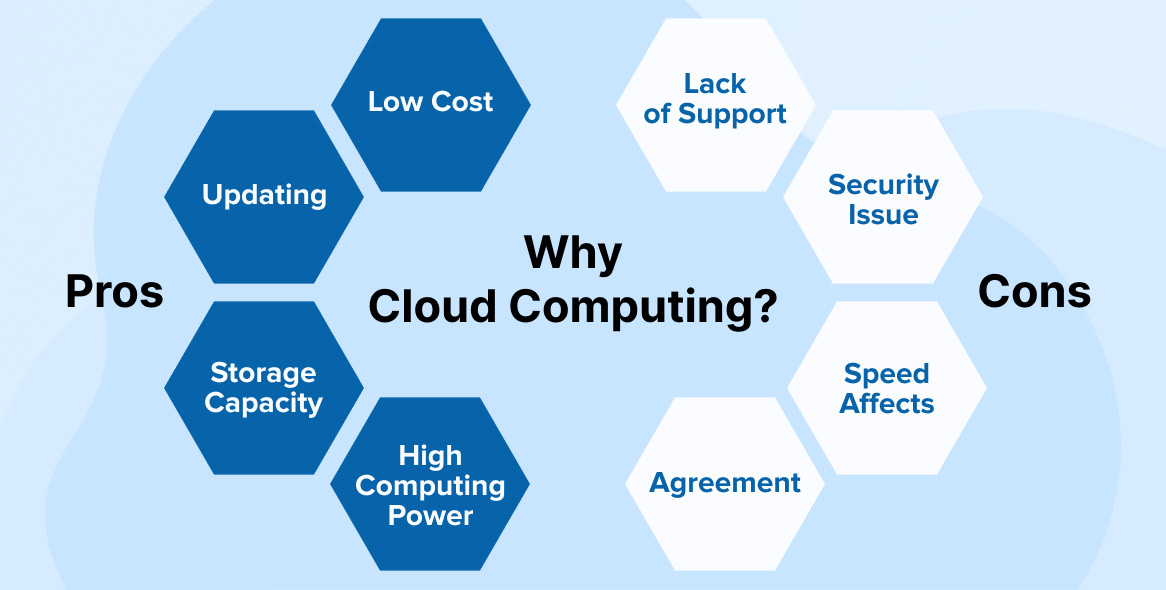
Cloud computing is important because it transforms how businesses and individuals use technology. It removes the need for expensive physical infrastructure and allows users to access powerful computing resources instantly. This flexibility is especially useful for businesses that experience changing workloads, as they can scale resources up or down based on demand.
Another major importance of cloud computing is accessibility. Users can access their files, applications, and systems from anywhere in the world as long as they have an internet connection. This has made remote work, online collaboration, and global business operations much easier. Additionally, cloud computing improves efficiency, reduces downtime, enhances data security, and supports innovation by allowing developers to build and deploy applications faster.
Detailed Step-by-Step Guide to Understanding Cloud Computing
Step 1: Understanding the Basic Concept
The first step in learning cloud computing is understanding its core idea. Instead of storing data on your personal computer, you store and access it on remote servers connected through the internet. These servers are maintained by cloud providers who ensure reliability, security, and performance. This means you don’t need to worry about hardware maintenance or storage limitations.
Cloud computing also works on virtualization technology, which allows one physical server to act like multiple virtual servers. This improves efficiency and allows multiple users to share resources safely and securely.
Step 2: Learning Cloud Service Models
Cloud computing is divided into three main service models: Infrastructure as a Service (IaaS), Platform as a Service (PaaS), and Software as a Service (SaaS). IaaS provides virtual machines and storage, PaaS offers a platform for developers to build applications, and SaaS delivers ready-to-use software like email or online storage.
Each model serves a different purpose depending on user needs. Businesses often use a combination of these services to optimize their operations and reduce costs while maintaining flexibility.
Step 3: Exploring Deployment Models
There are also different deployment models in cloud computing, including public cloud, private cloud, and hybrid cloud. Public clouds are shared platforms available to anyone, private clouds are dedicated to a single organization, and hybrid clouds combine both for greater flexibility.
Choosing the right model depends on security needs, budget, and business requirements. Large enterprises often prefer hybrid models for better control and scalability.
Step 4: Using Cloud Services Practically
Once you understand the basics, the next step is practical usage. You can start by using simple cloud services like Google Drive, Dropbox, or OneDrive for storage. Then you can explore cloud platforms like AWS or Azure for more advanced learning.
Many platforms offer free tiers that allow beginners to experiment with cloud services without any cost. This hands-on experience is essential for building strong cloud computing skills.
Step 5: Learning Cloud Security Basics
Security is a critical part of cloud computing. Users must understand how data is protected in the cloud through encryption, authentication, and access control. Cloud providers invest heavily in security systems, but users also need to follow best practices like using strong passwords and enabling multi-factor authentication.
Understanding security ensures safe usage of cloud platforms and prevents data breaches or unauthorized access.
Benefits of Cloud Computing
- Reduces IT infrastructure and hardware costs significantly
- Provides scalable resources based on demand
- Enables remote access from anywhere in the world
- Improves collaboration and productivity
- Offers automatic software updates and maintenance
- Enhances data backup and disaster recovery options
- Increases business flexibility and innovation
- Supports faster application development and deployment
Disadvantages / Risks
- Requires stable internet connection for full functionality
- Potential security and privacy concerns if not managed properly
- Risk of vendor lock-in with a single provider
- Limited control over infrastructure for users
- Possible downtime due to provider issues
- Costs can increase if not monitored properly
- Compliance challenges for sensitive data
Common Mistakes to Avoid
One common mistake beginners make is assuming cloud computing is completely risk-free. While cloud providers offer strong security, users must still manage their own data responsibly. Another mistake is ignoring cost management, which can lead to unexpected bills when resources are not properly monitored.
Many beginners also fail to understand different cloud service models and end up using the wrong solution for their needs. It is important to learn the difference between IaaS, PaaS, and SaaS before choosing any service. Lastly, not practicing hands-on experience is a major mistake. Without practical usage, understanding remains incomplete and theoretical.
FAQs
1. What is cloud computing in simple words?
Cloud computing means using internet-based services to store data and run applications instead of using your own computer’s hardware.
2. Is cloud computing safe?
Yes, cloud computing is generally safe because providers use advanced security systems, but users must also follow good security practices.
3. What are examples of cloud computing?
Examples include Google Drive, Netflix, Dropbox, Microsoft 365, and AWS cloud services.
4. Do I need technical skills to learn cloud computing?
No, beginners can start with basic tools and gradually learn advanced concepts with practice and training.
5. What are the main types of cloud computing?
The main types are public cloud, private cloud, and hybrid cloud, each serving different business needs.
6. Why is cloud computing important for businesses?
It helps businesses reduce costs, improve flexibility, scale easily, and enhance productivity.
Expert Tips & Bonus Points
Start learning cloud computing with free platforms and gradually move to advanced services. Focus on understanding real-world use cases instead of memorizing theory. Practice regularly with hands-on labs to build confidence. Learn at least one major cloud provider like AWS, Azure, or Google Cloud in depth. Keep track of cloud cost management to avoid unnecessary expenses. Also, stay updated with new cloud trends like serverless computing and edge computing, as these are shaping the future of the industry.
Conclusion
Cloud computing has completely transformed the way we use technology in daily life and business operations. It offers flexibility, scalability, and cost efficiency that traditional computing systems cannot match. From storing simple files to running complex enterprise applications, cloud computing plays a vital role in modern digital infrastructure. As more companies move toward digital transformation, the demand for cloud computing skills continues to grow rapidly.
For beginners, learning cloud computing opens the door to many career opportunities in IT, development, and cybersecurity. With continuous practice and understanding of core concepts, anyone can master this technology. The future of computing is in the cloud, and those who understand it today will lead tomorrow’s digital world.